
GitHub Search in Your Browser
Overview
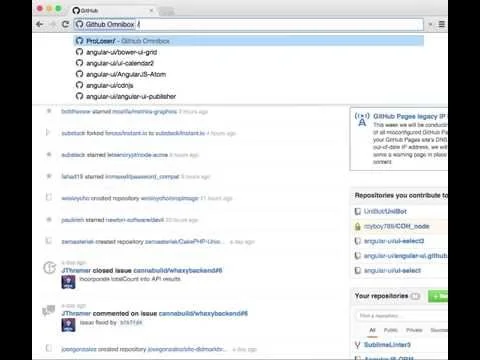
The software brings the powerful command-driven search functionality of GitHub directly into your browser, enabling users to navigate GitHub repositories, profiles, and sections with speed and precision. Designed for developers and technical teams, it streamlines workflows by allowing instant access to specific projects, code sections, or followed users through a simple search interface. This tool eliminates the need for multiple page reloads and manual navigation, significantly reducing time spent searching across GitHub’s expansive ecosystem. It is particularly useful for developers managing multiple repositories or collaborating on large-scale open-source projects.
The developer, GitHub Inc., is a well-established name in the software development community, known for its widely used version control platform. While specific background details about the tool’s development are not provided, its integration with GitHub’s infrastructure suggests a high level of reliability and alignment with core platform features. The software operates as a browser extension, making it accessible across multiple operating systems, including Windows, Mac, and Linux, which enhances its usability for cross-platform development teams.
Key Features & Capabilities
- Command-Powered Search – Access any GitHub repository, user profile, or code section instantly using a keyboard-driven interface, similar to GitHub’s built-in command search.
- Personalized Autocompletion – After authentication, the tool provides context-aware suggestions based on your GitHub activity, including followed users, starred repositories, and recent searches.
- Customizable Repo Menu – Add badges and links to the GitHub repository sidebar for commonly used services such as TravisCI, Gemnasium, and GitterIM, improving visibility of integration statuses.
- Extensible Customization – Users can define and add their own custom links and badges to match their preferred development workflow and toolchain.
- Seamless Browser Integration – Works directly within the browser, requiring no additional setup beyond installation and authentication.
These features are ideal for developers who frequently switch between repositories, monitor CI/CD pipelines, or collaborate with distributed teams. For example, a developer can jump to a specific PR or issue in a project with a single command, or quickly verify the status of a build via a TravisCI badge. The ability to customize the repository menu enhances workflow visibility and reduces context switching.
User Interface, Workflow & Performance
The user interface is minimal and integrated directly into the browser’s UI, designed to remain unobtrusive while offering powerful functionality. Navigation is achieved through a keyboard-triggered command palette, allowing users to initiate searches with a single keystroke. The layout prioritizes speed and efficiency, with a clean, text-based interface that avoids visual clutter.
Workflow efficiency is enhanced by the tool’s focus on rapid access and contextual suggestions. Users can execute actions such as opening repositories, navigating to specific code files, or viewing pull requests with minimal input. The tool’s performance is expected to be responsive, given its lightweight nature and direct integration with GitHub’s APIs. However, exact performance details were not specified.
Stability is likely high due to its reliance on GitHub’s infrastructure and standard browser extension architecture. The developer did not specify resource usage details, but given the small file size of 2.5 MB, it is expected to have a low impact on system performance.
Compatibility & System Requirements
The software is compatible with Windows, Mac, and Linux operating systems, making it accessible to a broad range of developers regardless of their primary platform. It functions as a browser extension, so compatibility depends on the browser’s support for extensions and the presence of required APIs.
The installation size is 2.5 MB, which is compact and suitable for systems with limited storage. The software version is 1.0.0, indicating a stable initial release. Exact system requirements were not listed, but its lightweight design suggests it will run efficiently on most modern systems. The developer did not provide additional system requirements.
Pros and Cons
Pros
- Fast, command-driven navigation within GitHub
- Personalized autocompletion after login
- Customizable repository sidebar with service badges
- Lightweight at only 2.5 MB
- Works across Windows, Mac, and Linux
Cons
- Requires authentication for full functionality
- Limited to GitHub ecosystem
- No offline mode available
- Customization requires manual setup
FAQ Section
Is this tool compatible with all major browsers?
The software is designed to work with browsers that support extensions, but specific browser compatibility was not detailed in the provided information.
Does the tool store my GitHub credentials?
The tool does not store user credentials directly. It uses secure OAuth authentication through GitHub’s official API to maintain user privacy and security.
Can I use this tool without logging in?
Basic search functionality is available without authentication, but personalized autocompletion and full customization features require a GitHub login.
How often does the tool receive updates?
Updates are managed through the browser’s extension store. The latest version is 1.0.0, and future updates will be delivered automatically when available.
Is this software free to use?
Yes, the software is completely free to download and use, with no hidden fees or subscription models.
Final Thoughts
This browser extension delivers a powerful, streamlined way to interact with GitHub, especially for developers who rely on frequent navigation and integration visibility. Its command-based interface, personalized suggestions, and customizable sidebar make it a valuable addition to any developer’s toolkit. While it requires an active GitHub account and online access, its lightweight design and cross-platform support ensure broad accessibility. For developers seeking to reduce friction in their daily GitHub workflows, this tool offers a significant boost in productivity and efficiency.
Download GitHub Search in Your Browser now.







